
If you’re searching for practical guidance on DevOps deployment strategies, you probably want to streamline releases and cut downtime. Build a more reliable pipeline, maybe. The real friction? There’s no shortage of tools, frameworks, and methodologies, so many that figuring out which deployment approach actually fits your team’s workflow and business goals becomes the bottleneck. That’s where most teams get stuck.
DevOps deployment strategies, blue-green deployments, canary releases, rolling updates, feature flags, each serves a different purpose. Blue-green? Instant rollback. Canary lets you test with actual users before you roll out broadly. Rolling updates spread the load across your infrastructure. And feature flags decouple deployment from release entirely. The real question isn’t which strategy’s objectively best. It’s which one aligns with your risk tolerance, your infrastructure constraints, and what’ll actually break if something goes sideways. We’ll walk through how each works, when you’d actually reach for it, and what trade-offs you’re making to get the benefits you want.
We’ve built these insights from years of hands-on implementation, proven industry practices, and studying the DevOps toolchains that top engineering teams actually rely on. Here’s concrete guidance. You’ll learn how to pick and roll out a deployment strategy that actually accelerates speed, stability, and scale in your dev cycle, not just theoretically but in real production environments where it matters.
From code to customer: mastering modern deployment
Deployment is the bridge between a developer’s laptop and a user’s screen, where value becomes visible. Yet like swapping engines mid-flight, it carries real risk. Every release is a calculation.
In CI/CD, continuous integration and continuous delivery, deployment means pushing code into production, the live environment where customers actually use it. Sure, some folks swear manual releases are safer. But that’s like preferring paper maps over GPS. Comforting? Maybe. Fast? Not a chance.
Modern DevOps teams automate rollouts with blue-green deployments, two identical environments that let you shift traffic without breaking a sweat. Downtime drops. Bugs get caught faster. The real trick? Monitor your metrics constantly, because data’s your air-traffic control, and without it you’re flying blind. Without solid observability, you’ve got no visibility into what’s actually happening in production, which means you can’t react when something goes wrong. Deployment transforms code into production systems, but only if you’re watching the whole time.
The core principles: what makes a deployment “effective”?
Before choosing tactics, define the goal. An effective deployment gets new code out the door with minimal downtime, less risk, faster feedback, and rollbacks that don’t require a 2 a.m. Emergency call. It works. If it doesn’t work, it fails safely, and you’re not waking the team in a panic at midnight to fix it.
Build a strong CI/CD foundation first. Continuous Integration means merging code frequently, catching bugs before they metastasize. Continuous Delivery keeps your code production-ready at all times. Then Continuous Deployment handles the actual releases automatically, pushing every approved change live without hand-wringing, no gatekeepers, no delays. You get precision. Lower risk. The kind of automated execution that’d be impossible to manage manually, and honestly, you’ll wonder how you ever shipped software without it.
Equally important? Limit your blast radius. When something breaks, you don’t want damage sprawling across your whole user base. Staged rollouts contain it. So do feature flags and automated tests. What makes them work is simple: you validate changes on a small group first, then expand once you’re confident the fix won’t break anything else. Everyone else stays protected the entire time.
Some folks claim heavy safeguards slow innovation down. Wrong. Disciplined DevOps deployment strategies actually accelerate delivery by preventing the expensive failures that derail projects, and that’s not conjecture, it’s what the data shows when you measure rollback time. It’s the real safety net, the one that lets you move fast without breaking everything. So stop treating deployment discipline as friction. It’s fuel.
A deep dive into key deployment patterns

Modern software teams lean on DevOps deployment strategies to ship features faster without breaking what’s already working. Not all deployment patterns are created equal, though. Each comes with trade-offs. Pick the wrong one and you’re looking at downtime, frustrated users, or those 2 a.m. Rollback sessions fueled by cold pizza and regret, the kind of night you don’t forget.
Let’s break down four key patterns, define what they actually mean, and explore where they shine, and where critics raise valid concerns.
Blue-Green Deployment
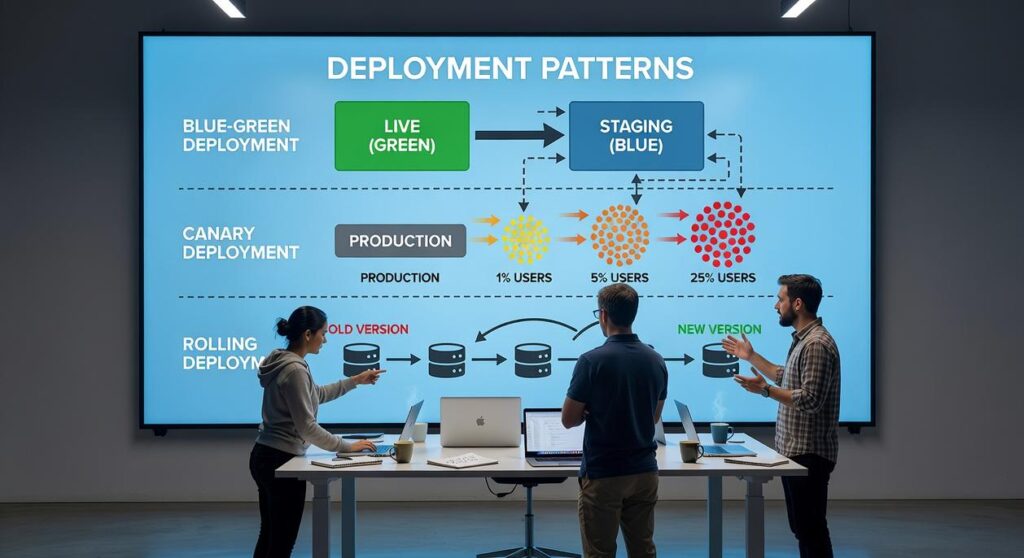
Blue-Green deployment sets up two identical production environments. Blue’s running the current live version, while Green hosts the new release. Once Green’s fully tested, you flip the switch and traffic moves over instantly. No downtime. No gradual rollout.
Benefits:
- Near-zero downtime during releases
- Instant rollback by redirecting traffic to Blue
- Reduced deployment risk
Large e-commerce platforms lean on Blue-Green during peak shopping seasons. Here’s why: if checkout breaks after a release, they flip traffic back instantly. Revenue stays safe. Your reputation doesn’t tank either, which matters when you’re processing thousands of orders per second and one bad deploy can cost you millions in abandoned carts.
Counterargument: Critics point out the cost. Maintaining duplicate infrastructure can double hosting expenses. For startups operating on tight margins, that’s significant.
That’s fair, but here’s the thing: downtime costs spiral fast. They’ll easily outpace whatever you save on infrastructure. Gartner puts the average cost of IT downtime at $5,600 per minute, and for platforms that generate revenue, blue-green deployments tend to pay for themselves.
Canary Deployment
A canary deployment gets new code in front of a small group of users first. They’re your early warning system. If something breaks, you catch it before it spreads to everyone else, before it becomes a real problem that affects your whole user base.
Benefits:
- Real-world validation with limited exposure
- Data-driven rollout decisions
- Lower blast radius if issues arise
Streaming platforms frequently use canary releases to test new recommendation algorithms on 5% of users before expanding.
Counterargument: Rollouts take longer and require strong observability tools. Without robust monitoring, subtle issues may go unnoticed.
You’re right, modern monitoring platforms like Datadog and Prometheus actually make this work. The trick is defining your success metrics before you launch the canary. Otherwise? You’re just guessing. And guessing on production traffic is how you end up rolling back at 2 a.m.
Rolling Deployment
Definition: Rolling deployment gradually replaces old instances with new ones, either one at a time or in batches. Both versions temporarily coexist.
Benefits:
- No need for duplicate environments
- Efficient use of infrastructure
- Straightforward implementation in containerized systems like Kubernetes
Many SaaS platforms prefer rolling updates because they align naturally with auto-scaling clusters.
Counterargument: If the old and new versions aren’t backward compatible—especially at the database level—users may experience instability.
That’s a legitimate concern. Schema versioning and backward-compatible APIs are essential safeguards. Without them, rolling updates can feel like changing airplane parts mid-flight.
A/B Testing (via Feature Flags)
Feature flags let teams ship code that’s basically turned off, then flip it on for specific groups of users. Deploy the code one day. Flip the switch the next. That simple gap, between actually deploying something and letting people use it, rewires how you think about releases. Deployment’s the technical piece. Feature exposure is the business side, and that’s where the real control lives.
Benefits:
- Precise control over user experience
- Business metric experimentation
- Instant feature rollback without redeploying
Companies like Netflix and Amazon rely heavily on feature flags to test UI changes and pricing experiments.
Counterargument: Feature flags increase code complexity and technical debt if not managed carefully.
Agreed. Poorly maintained flags can clutter codebases. A centralized flag management system is essential.
Interestingly, feature flag experimentation often complements insights from the role of ai in software engineering workflows, where AI-driven analytics help teams interpret A/B results faster.
No pattern works for everyone. Your risk tolerance matters. So does your budget for infrastructure, where your observability actually stands, and what you’re trying to achieve. Deployment isn’t just pushing code, it’s about keeping users safe while you move fast. That tension’s real.
Automating your deployments: essential tools and practices
Automating deployments cuts down human error, those brutal 2 a.m. Rollbacks that haunt you for weeks, and delivers releases faster and more reliably. Your features ship quicker. Users actually stay happy because things don’t break at midnight. And your team? They sleep. But here’s what really matters: it’s not just a technical upgrade. You stop reacting to fires and start preventing them before they start.
CI/CD platforms like GitLab CI, GitHub Actions, and Jenkins handle the heavy lifting, they orchestrate your entire build, test, and deploy pipeline. Every code change gets validated automatically before it hits production. You’re not shipping bugs to customers. You’re not losing sleep over what made it through. That’s the real payoff.
Infrastructure as Code tools like Terraform or Ansible create identical, reproducible environments. That consistency? It’s what makes DevOps deployment strategies, Blue-Green, rolling updates, canary releases, actually work without keeping you up at night.
Meanwhile, containerization and orchestration with Docker and Kubernetes keep applications portable and scalable.
Finally, monitoring and observability tools like Prometheus or Datadog give you real-time insights into what’s actually happening in production. You catch issues early. And you’re not deploying blind anymore.
Building a resilient and agile delivery pipeline
There’s no single “best” deployment strategy. It depends on your app’s architecture, how much risk your team can actually tolerate, and what your users need. The real win is ditching manual, high-stakes “big bang” releases. They kill innovation. They blow up risk. Automated DevOps strategies like Canary or Blue-Green do the work that matters: less downtime, bugs caught early, features shipped without the anxiety. You get speed and stability both. Start small, automate one manual step, throw in a health check, then build from there. That’s it.
Take control of your devops deployment strategy today
You came here looking for clarity on how to implement smarter, faster, and more reliable DevOps deployment strategies. Now you’ve got a practical roadmap to make it happen. Automation. CI/CD pipelines. Monitoring and rollback planning. Team collaboration. That’s what it takes to reduce downtime, eliminate bottlenecks, and ship with confidence, and you’ve seen how each piece fits together.
Understanding DevOps? That’s the easy part. The real headache is slow releases, inconsistent environments, and deployments that crater your budget and tank stakeholder confidence. These problems won’t solve themselves. They compound. And they snowball faster the longer you wait.
The next step is simple: audit your current pipeline, identify one weak point, and implement a measurable improvement this week. Then build from there.
Want proven insights that actually work? Our DevOps resources are used by thousands of tech professionals. Step-by-step guides. Expert breakdowns that don’t waste your time with fluff. Your deployments shouldn’t feel like a constant battle, and they don’t have to. Make them predictable instead of a recurring headache, and you’ll actually have time to focus on what matters. Start optimizing today.
 There is a specific skill involved in explaining something clearly — one that is completely separate from actually knowing the subject. Zayric Vornhaven has both. They has spent years working with software development insights in a hands-on capacity, and an equal amount of time figuring out how to translate that experience into writing that people with different backgrounds can actually absorb and use.
Zayric tends to approach complex subjects — Software Development Insights, Tech Tutorials and How-To Guides, Emerging Tech Trends being good examples — by starting with what the reader already knows, then building outward from there rather than dropping them in the deep end. It sounds like a small thing. In practice it makes a significant difference in whether someone finishes the article or abandons it halfway through. They is also good at knowing when to stop — a surprisingly underrated skill. Some writers bury useful information under so many caveats and qualifications that the point disappears. Zayric knows where the point is and gets there without too many detours.
The practical effect of all this is that people who read Zayric's work tend to come away actually capable of doing something with it. Not just vaguely informed — actually capable. For a writer working in software development insights, that is probably the best possible outcome, and it's the standard Zayric holds they's own work to.
There is a specific skill involved in explaining something clearly — one that is completely separate from actually knowing the subject. Zayric Vornhaven has both. They has spent years working with software development insights in a hands-on capacity, and an equal amount of time figuring out how to translate that experience into writing that people with different backgrounds can actually absorb and use.
Zayric tends to approach complex subjects — Software Development Insights, Tech Tutorials and How-To Guides, Emerging Tech Trends being good examples — by starting with what the reader already knows, then building outward from there rather than dropping them in the deep end. It sounds like a small thing. In practice it makes a significant difference in whether someone finishes the article or abandons it halfway through. They is also good at knowing when to stop — a surprisingly underrated skill. Some writers bury useful information under so many caveats and qualifications that the point disappears. Zayric knows where the point is and gets there without too many detours.
The practical effect of all this is that people who read Zayric's work tend to come away actually capable of doing something with it. Not just vaguely informed — actually capable. For a writer working in software development insights, that is probably the best possible outcome, and it's the standard Zayric holds they's own work to.